
Sage 100c · AI assistant · 26 modules · Morocco

The operations layer your Sage 100c is missing

An AI assistant that queries your data, OCR for your supplier invoices, customer credit control and your tax returns (EDI filing) — on the web and on mobile, written into your Sage database. No double entry, no exports to stitch back together.

optiflowpro · AI assistant
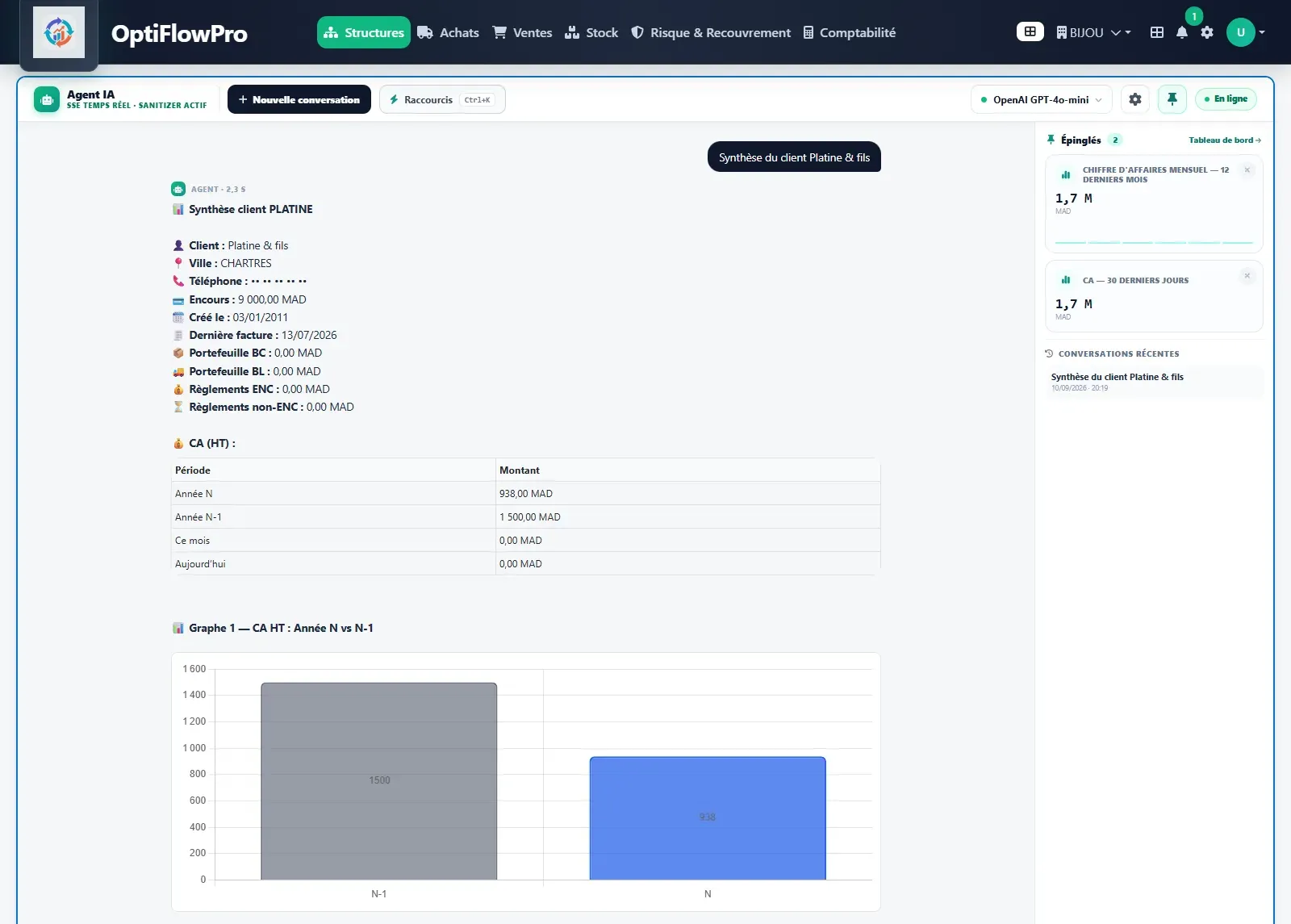
OptiFlowPro AI assistant: asked for a summary of customer Platine & fils, it returns the customer card, revenue by period and a year-on-year chart, read from the Sage database
Real screenshot, Sage demonstration database.

26

business modules

2

Sage integration channels

Cloud or local

your choice for AI

Multi-company

several Sage databases, one application

Sage 100 keeps your books.
OptiFlowPro brings it the full power of AI.

Your ERP stays the system of record. OptiFlowPro plugs into it and adds what artificial intelligence does best: answering your questions from your data, reading your invoices, watching your credit exposure, preparing your returns. The manual work goes away, your Sage stays untouched.

  1. Your data is in Sage, your decisions are in a spreadsheet

    Manual exports, pivot tables rebuilt every month, figures already out of date by the time they reach the meeting.

  2. Your supplier invoices are keyed by hand

    Accounting time spent on re-keying, and errors that only surface at reconciliation.

  3. You find out about credit exposure too late

    No limit alert, no block at order entry: the risk is discovered once the delivery has left.

  4. Your tax returns are rebuilt every month

    Deduction statement, output VAT, withholding tax: a manual assembly repeated at every SIMPL-TVA, SIMPL-IS or SIMPL-IR deadline.

What sets us apart

Four things no spreadsheet will replace

AI assistant

Ask a question in plain language, get the answer from your Sage data. The assistant builds your indicators, analyses variances and prepares your entries — which you approve before execution.

  • OpenAI
  • Anthropic
  • Gemini
  • Mistral
  • Groq
  • Ollama locally

With a local model, no data leaves your server.

Learn more

OptiFlow OCR

Your supplier invoices read, checked and posted into Sage automatically. Only invoices actually written to the ledger count against your quota: a failed scan is free.

Learn more

OptiRisque

Creditworthiness record per customer, credit blocks applied inside Sage itself, bank remittance slips and exposure alerts. The control happens before the order, not after the delivery.

Learn more

EDI tax returns

Deduction statement, output VAT, withholding tax, consistency checks and an EDI file ready for SIMPL-TVA filing. SIMPL-IS and SIMPL-IR come next. Moroccan tax obligations handled from the same application as your operations.

Learn more

Integration

Wired into your Sage database,
not sitting beside it

OptiFlowPro reads from and writes to your Sage 100c database through two distinct channels: direct access for reading, a dedicated web service for controlled writes. There is never a second version of the data.

  • No change to your Sage configuration
  • No replication to a third-party cloud
  • Windows Server with IIS, or Apache — your choice
  • Available at the desk and on mobile
Architecture

Sage 100c

SQL Server

  • Accounting
  • Sales management
  • Payroll

Channel 1 · Direct

Reads from the Sage database

Channel 2 · Web service

Controlled writes

OptiFlowPro

  • AI assistant
  • Invoice OCR
  • OptiRisque
  • SIMPL-TVA
  • Sales & purchasing
  • 26 in total

Your data stays on your server, next to Sage.

Functional coverage

Twenty-six modules, enabled according to your plan. Each one reads from and writes to your Sage database, with no double entry. Here are the six domains they cover.

Sales

  • Customer management
  • Sales orders
  • Documents and quotes
  • Delivery management
  • Customer 360°
  • Customer payments

Purchasing

  • Supplier management
  • Purchase orders
  • Purchase documents
  • Supplier 360°
  • Supplier payments
  • Invoice OCR

Stock and logistics

  • Stock levels
  • Stock movements
  • Inter-warehouse transfers
  • Warehouse queue
  • Dispute handling

Finance and compliance

  • SIMPL-TVA return
  • VAT and CIT withholding
  • Certificates
  • Customer statements
  • Credit risk and collections

Management

  • AI assistant and indicators
  • Customer summary
  • Supplier summary
  • Notifications and alerts
  • Dashboards

Administration

  • Users and permissions
  • Multi-company
  • Translations
  • Audit log and security
  • Maintenance and migrations

On your infrastructure,
not in a third-party cloud

The application installs on your server, next to Sage. For a company with data residency requirements, that constraint is settled from the outset.

  1. Step 1 — Audit of your installation

    Sage version, modules in place, customisations, data volume. We tell you what integrates as-is and what needs development.

  2. Step 2 — Installation and setup

    Deployment on your server, connection to your Sage database, user creation and per-module permissions.

  3. Step 3 — Training and support

    Training by role — accounting, sales, warehouse — and support handled by the team that develops the application.

Three plans, matched to your scope

Pricing depends on the number of users, the number of Sage companies and the modules you keep. We establish it after auditing your installation.

Essential

Small businesses and pilots

The full sales domain, delivered whole.

  • 5 users
  • 1 Sage company
  • Customer and document management
  • Sales orders
  • Delivery management
  • Stock levels
  • Customer 360°

Business

Recommended

Established SMEs

Sales, purchasing and payments in a single application.

  • 15 users
  • Up to 2 Sage companies
  • Everything in Essential
  • Purchasing and suppliers
  • Customer and supplier payments
  • Stock movements
  • Supplier 360°

Premium

Groups and multi-company

Every module, AI and OCR included.

  • 40 users
  • 5 Sage companies included
  • Everything in Business
  • AI assistant
  • OptiFlow OCR
  • OptiRisque
  • SIMPL-TVA return

See the three plans and options in detail

Let’s see how it looks on your Sage installation

A demo built on your own use cases, not on a showcase dataset. We will also tell you what does not apply to you.