
Supplier invoice OCR for Sage 100
Your supplier invoices read, checked and posted into Sage automatically.
The real cost of manual entry
A supplier invoice keyed by hand costs a few minutes of accounting time, carries a non-zero chance of error, and produces a discrepancy that will only surface at reconciliation — sometimes weeks later.
Multiply that by your monthly volume. It is a full cost centre.
What OptiFlow OCR does
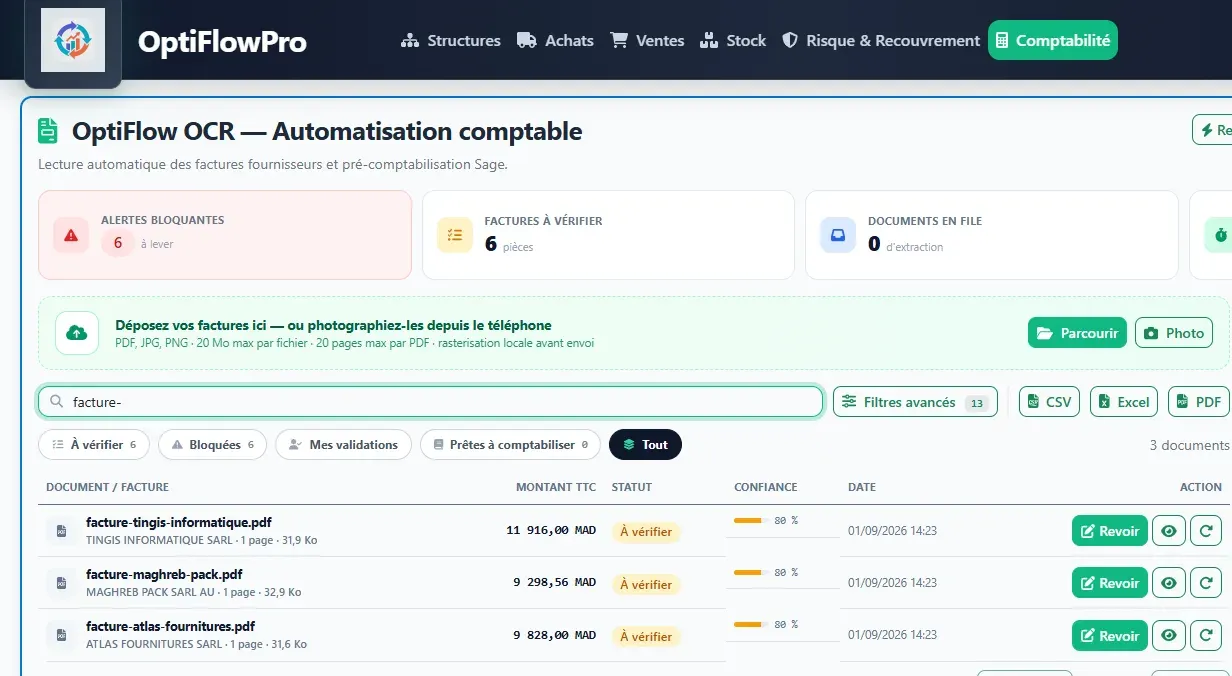
You drop in your invoices. The application reads them, extracts the data — supplier, number, date, due date, amounts, VAT, lines — then presents everything for review before posting it to Sage.
Processing runs as a queue: your teams see what is pending, what is done and what needs manual attention.
The checks before posting
The OCR does not post blindly. Before writing an entry, the application verifies what it read: the supplier matches your ledger, the total matches the sum of the lines, the VAT is consistent, and the invoice is not a duplicate.
An invoice that fails the checks is set aside for manual review rather than posted incorrectly.
The quota: you only pay for what is posted
The counter is triggered only at posting, meaning when the invoice is actually written to Sage.
In practice:
- An unreadable scan you re-key by hand costs nothing.
- A calibration test costs nothing.
- An invoice rejected by the checks costs nothing.
The counter starts at zero on activation: invoices you had already posted before go-live are neither charged nor counted.
Checking the quota
Your teams see their usage in two places: a gauge on the OCR dashboard, and a detailed panel in the module settings — posted, remaining, ceiling, with an alert as the limit approaches.
Nobody is caught out by an exhausted quota on closing day.
What you need to use it
OptiFlow OCR is included in the Premium plan. It is available as an option on the Essential and Business plans, with an invoice volume we size together from your purchasing history.